

FAQ Center of DeeKeep Deezer Music Converter
[1]Launch DeeKeep Deezer Music Converter on your computer and log in to your Deezer Music account. Please note that DeeKeep will not take any information out of your account. Then go to the Register section to get the registration window.
[2]Fill the two blanks with your registration Email and license code that you have received from the email. Then click "Register" to register the program.
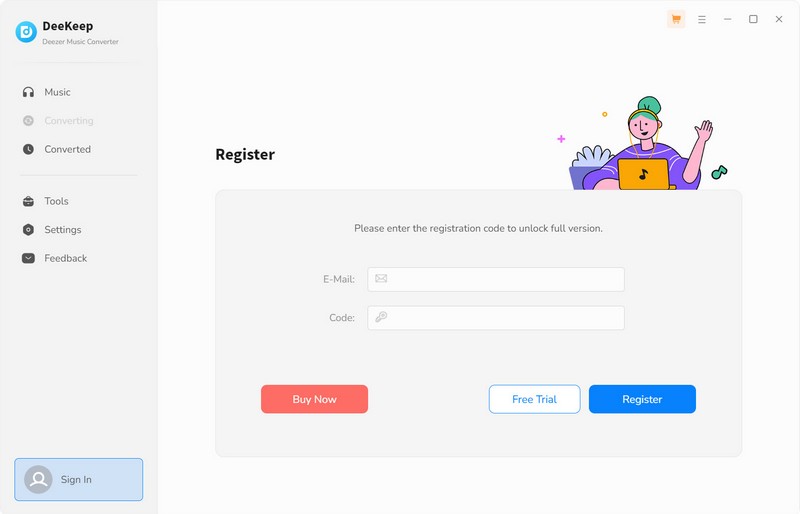
There are three possible causes for invalid code.
[1] The registration code doesn't match the program. Please make sure you are running the right program.
[2] Extra spaces are accidentally added while filling in your e-mail and code. Please check whether there are spaces before or after the registration info.
[3] Each registration code can be activated on only one device. If the code has been used on another device, please deactivate or sign out from the previous device before activating it again.
If you still get the Error Message, please contact our support team via support@deekeep.com for help.
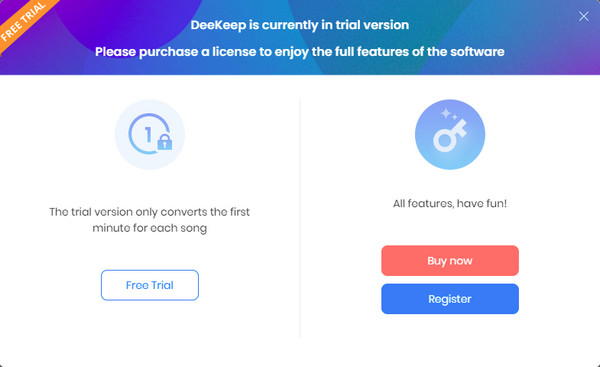
The trial version allows you to convert the first one minute of each song. You will get the message as below when you try to convert music with the trial version. To unlock the restriction, please purchase a license.
In general, the new license key will be sent to the email address once the subscription is renewed. If you do not receive the license key after auto-renewal subscription, please check your Spam E-mail folder just in case it was incorrectly classified as spam. And you can provide registered email address and order ID to our support team via support@deekeep.com. We will reply to your message within 24 hours on weekdays and 48 hours on weekends. And we will send you the newly updated license quickly.
Yes, DeeKeep Deezer Music Converter supports batch conversion, so you can add the entire playlist to convert. please note that it can convert one playlist at a time.
DeeKeep supports online music playback, please make sure you have downloaded the latest version of the program.
[1] Please make sure that you have installed the latest version of DeeKeep. Go to Menu > Check for updates to install the latest version.
[2] Try switching between the app and web player download sources.
[3] Go to Menu > Clear Cache, restart the program, and try again. If the issue continues, find and delete the program folders to clear the cache manually, then restart DeeKeep.
Windows: Go to File Explorer, enter C:\ and delete the DeeKeep Deezer Music Converter folder.
Mac: Open Finder > select Go > Go to Folder (or press Command + Shift + G), enter ~/, and delete the DeeKeep Deezer Music Converter folder.
[4] Make sure you can log in to your account normally through the official website or app and that your subscription is active if needed for a conversion.
[5] Check your network connection and regional restrictions. Disable VPN or try switching to another network if necessary.
If the problem persists, please contact our support team via Feedback on the left. When submitting your request, please include a detailed description of the issue, troubleshooting steps you have tried, screenshots or screen recordings, and log files.
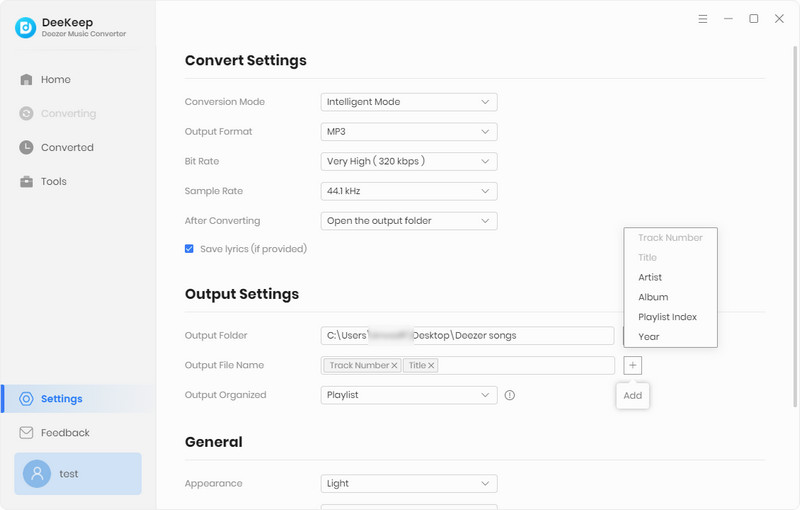
The latest version of DeeKeep Deezer Music Converter supports keeping the track number for albums. Please choose "Track Number" in the "Output File Name" tab of the Setting window. In addition, if you want to save the converted songs in the same order as the original playlist, please choose "Playlist Index".
For better development of DeeKeep products, we adopt new technology from version 1.1.9 which is no longer compatible with macOS 10.15 or lower systems.
There are some solutions if you can not use the DeeKeep program for this reason:
[1] Update your macOS system to Mac 11 or above. The latest version is recommended.
[2] Switch to a Windows computer, and our support team will help you change the license.
Note: If the above solutions still cannot fix your problems, please provide the detailed information to our support team via support@deekeep.com. We will reply to your message within 24 hours on weekdays and 48 hours on weekends. And we will submit your feedback to our developers and inform you if the solution is available.
DeeKeep currently only supports to download songs with Deezer premium account.
You might have chosen "Intelligent Mode" or "YouTube Download" as the "Conversion Mode."
If "YouTube Download" is selected as the Conversion Mode, the program will download music from YouTube. However, if "Intelligent Mode" is chosen, the program will switch the audio source based on the network conditions. If the original audio source of the music platform cannot be read, the program will switch to downloading music from YouTube.
If you exclusively want to download music from the original audio source, please modify the "Conversion Mode" and set it to "Record Mode".
When you select the lossless output format, the program will download music with original sound quality by default. In this case, you can't select the bit rate manually. Additionally, you can get up to Deezer HiFi quality download(depending on your account type).